See
DJIA Cache
in action through real-world speed comparisons.
Looking for a WP Rocket alternative, or a FlyingPress alternative, that holds up outside synthetic tests? Watch real WordPress speed tests with DJIA Cache: before-and-after PageSpeed runs, mobile and logged-in user caching, and head-to-head comparisons on identical hosting. The full feature list and every licence option are one click away.
Performance demosBefore / after testsPlugin walkthroughs
Featured video preview
TTFB drop
-82%
Measured on cached routes
Load time
0.7s
After optimization stack
PageScore
100
Performance-first results
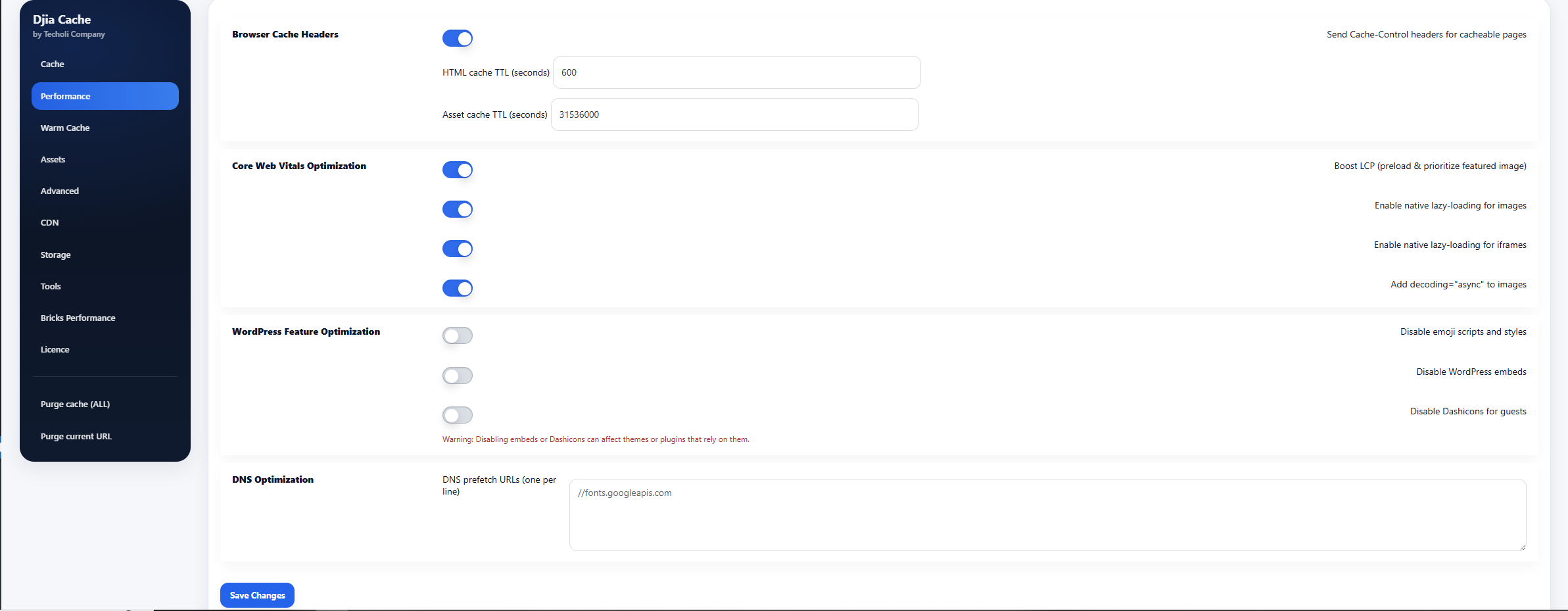
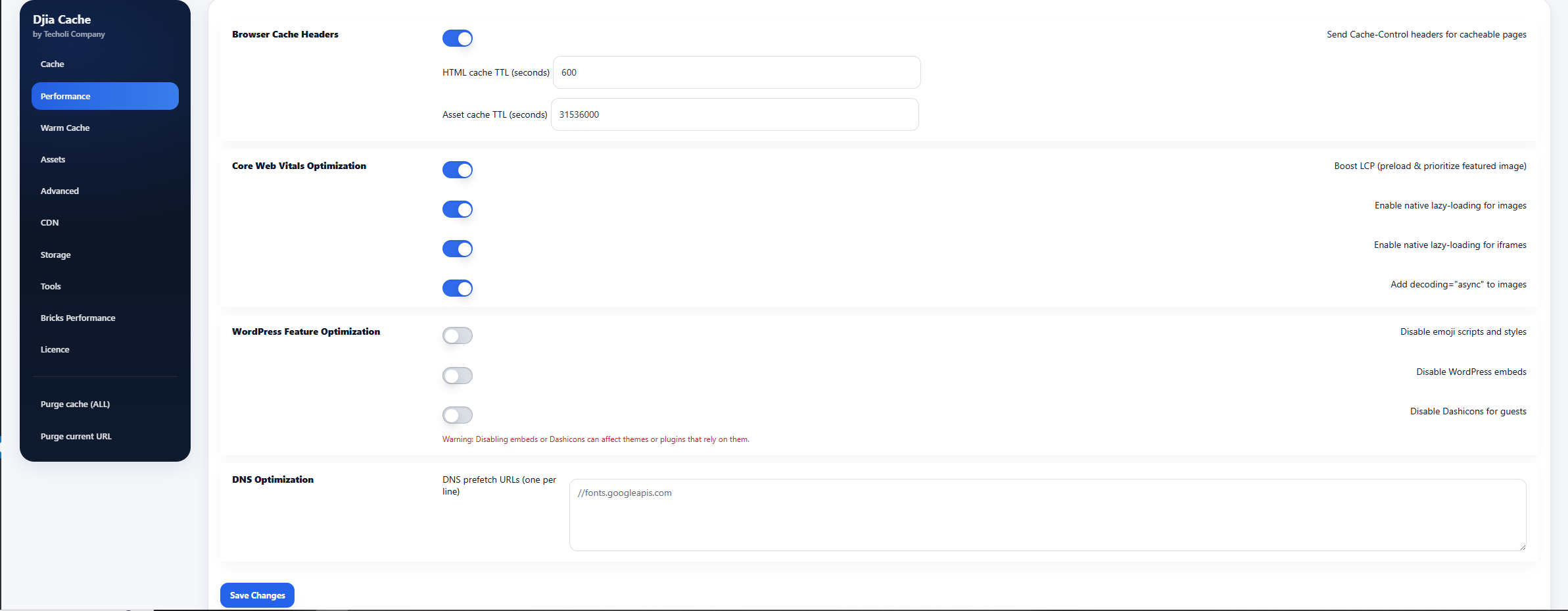
The Performance tab used in the tests below.
Video library
DJIA Cache as a WP Rocket alternative: real WordPress cache speed tests.
Every video is a screen recording of a live WordPress site: minimum settings, mobile cache, logged-in users, preload and direct comparisons with other cache plugins.
In this video, we test the site with only the basic (minimum) settings of the Djia Cache plugin enabled.
Without additional optimizations and complex settings.
Real Google PageSpeed results (mobile and desktop) are shown.
Watch the video and judge the performance for yourself.
7 min 24 sec94 Score
Mobile-first cachingInstant loading
Mobile Cache Loading
DJIA Cache creates a dedicated cache for mobile visitors, ensuring that mobile pages load instantly and are optimized specifically for smaller devices.
By serving a separate mobile cache, the system delivers faster load times, improved performance and a smoother browsing experience for mobile users.
5 min 11 secMobile
ADVANCED CACHINGUser cache
Logged-in User Cache
See how DJIA Cache serves dynamic routes, shop pages and logged-in users from per-role cache buckets while keeping content fresh.
8 min 02 secReal Test
REAL USER TESTPreload
Real-world speed. No tricks.
This demo shows the site exactly as a normal visitor experiences it — with no special browser setup, no hidden local cache, and no artificial advantages.
Just real frontend speed, stable delivery, and the kind of performance that actually matters to your users.
4 min 37 secPreload
Logged-in users (admin + frontend)
Djia Cache vs WP Rocket
This is a direct performance comparison between Djia Cache and WP Rocket,
tested under identical real-world conditions.
6 min 09 secREAL COMPARISON
Logged-in users (admin + frontend)
Djia Cache vs FlyingPress
Both sites run on the same hosting environment with identical setup,
plugins, and content. The only difference is the caching system in use.
9 min 16 secREAL COMPARISON
Performance comparisons
Before and after: homepage and WooCommerce store results.
Key metrics from our own test sites, measured on the same pages before and after enabling DJIA Cache.
Desktop setup
Real
Homepage benchmarkReal test
Homepage delivery before and after optimization
The same homepage tested on desktop before and after enabling DJIA Cache. First paint, largest paint and server response all drop once the page is served from cache.
First Contentful Paint
0.4s
Load time
Largest Contentful Paint
0.7s
Load time
TTFB
0ms
Cached response
Mobile setup
After
WooCommerceDynamic routes
Store performance comparison under real product traffic
A WooCommerce store with dynamic product and category pages. Smart caching keeps catalog pages warm while cart and checkout stay fully dynamic.
Cache hit
97%
Warm page delivery
Requests
-63%
Cleaner load path
PageScore
95
Performance result
Why trust these results
Real tests you can check yourself.
No synthetic lab runs: every result comes from a live WordPress site tested under real conditions.
🎬
Recorded on live sites
Every test is a screen recording of a real WordPress site, not a staged benchmark.
📊
Same hosting, same content
Comparisons with WP Rocket and FlyingPress run on identical servers, plugins and content. Only the cache plugin changes.
⚡
Measured with PageSpeed Insights
Results are shown in Google PageSpeed Insights on mobile and desktop, so you can verify them yourself.
THE DETAIL
How to judge a WP Rocket alternative
On this page
What to look for in a WP Rocket alternative
Most people start looking for a WP Rocket alternative for one of three reasons: the renewal price, a feature their stack needs that is not there, or a specific page that is still slow after everything has been switched on. Those are different problems, and only the third one is really about caching.
When you are comparing plugins, the thing worth measuring is not the PageSpeed number on a demo site. It is how the plugin behaves on the pages your visitors actually spend time on. A caching plugin can take any brochure homepage to a green score. The same plugin on a shop with four thousand products, a login, and a theme that prints inline CSS is a different test entirely.
So the questions that matter are concrete. Does page caching cover authenticated visitors, or do logged-in users fall back to the full PHP path? Are the dynamic routes excluded by default, or do you have to discover them? When content changes, does the cache rebuild itself, or does the next visitor pay for it? And when something breaks, can you see which rule caused it?
The recordings on this page are an attempt to answer those questions the only honest way: on live sites, with the settings visible, start to finish, including the parts where a number does not move.
The performance tab as it was configured for these tests: browser cache headers, lazy loading and resource hints.
How these tests were run
Every comparison on this page uses the same method, because a benchmark is only useful if the thing being changed is the only thing that changed.
Both sites in a comparison run on the same hosting plan, with the same PHP version, the same theme, the same plugins and the same content. One has DJIA Cache installed, the other has the plugin it is being compared against. Nothing else differs. No CDN is added on one side and not the other, and no server-level cache is enabled on either, because that would be measuring the host rather than the plugin.
Before each run the cache is purged from the tools tab and rebuilt, so neither site has a warm advantage left over from the previous test. The measurement is then taken with Google PageSpeed Insights, on mobile and desktop, and the whole thing is recorded on screen rather than reported as a number afterwards. You can see the URL, the settings and the result in the same frame.
This is not a laboratory. Live sites have variance, and running the same test twice will not give you the same millisecond. What it does give you is a fair comparison and enough context to judge whether a difference is real or noise.
Where DJIA Cache is different
The three things that separate DJIA Cache from a conventional caching plugin are all about what happens after the easy wins are taken.
The first is logged-in traffic. Page caching for authenticated visitors is a first-class module here rather than an edge case: entries are keyed by role, mobile and desktop are kept apart, and the routes that must stay dynamic are excluded by rule. On a shop or a membership site that is usually where the remaining slowness lives, because those pages are both the heaviest to build and the ones your best visitors use most.
The second is what happens after a purge. A cache that empties itself on every content change hands the cost of rebuilding to whoever arrives next. Sitemap preloading and hover prefetch mean that visitor is normally a background request rather than a customer, which is the difference between a fast site and a site that is fast on the second visit.
The third is Bricks. Builder-made layouts hide their largest element inside generated CSS, so the browser finds it late and the LCP figure suffers for reasons that have nothing to do with the server. The Bricks module preloads that element directly, and the Bricks Builder cache plugin page goes through what that changes in detail.
Warm cache settings: sitemap preload and hover prefetch, both active during the recordings.
Compared with FlyingPress
FlyingPress is the other plugin people put on the shortlist, and for good reason: it is a serious tool with a clear focus on front-end delivery and a reputation for doing the asset work well. The comparison video on this page runs it against DJIA Cache under the same conditions as the WP Rocket test.
What you will see in that recording is that on a straightforward page, two competent caching plugins land close together. That is the expected result, and anyone promising a dramatic gap on a simple homepage is selling you something. Both will remove PHP from the request, both will send sensible headers, and the remaining difference is small enough that your hosting will move it more than the plugin does.
The gap opens where the page stops being simple. Authenticated routes, a cache that has just been purged, and builder layouts whose largest element is referenced from a stylesheet are the three situations where the approaches diverge, and those are the three the recordings spend most of their time on.
Pick whichever handles your own pages best. That is a decision a video cannot make for you, which is why the trial exists.
What the numbers do and do not tell you
A PageSpeed score is a summary of a single run of a single URL on a simulated device. It is useful, it is also easy to over-read, and it is worth knowing which parts of it actually move when you install a caching plugin.
Time to first byte is the honest one. It measures how long the server took to start answering, and page caching improves it directly because the server stops building anything. If TTFB does not drop after you enable page caching, something is bypassing the cache, and that is a configuration problem rather than a plugin limitation.
Largest contentful paint moves for a different reason: not because the server is faster, but because the browser discovered the important image sooner. That is what preload hints are for, and it is why a builder-made page can have an excellent TTFB and a mediocre LCP at the same time.
Cumulative layout shift and the interaction metrics mostly reflect your theme and your third-party scripts. A caching plugin can help by delaying non-critical JavaScript, but it cannot fix a layout that reserves no space for an image. If a score refuses to move, the field data in Search Console is a better guide than another lab run.
The tools tab, used to purge and rebuild between every run so each test starts from the same state.
Testing it on your own site
Videos are evidence, not proof. The only test that settles whether a WP Rocket alternative is right for you is the one you run on your own stack, because your theme, your plugins and your host are the variables these recordings hold constant.
Run it the same way these tests were run. Measure first, before changing anything, and write the numbers down: TTFB and LCP on your homepage, on your heaviest category or archive, and on one page a logged-in visitor sees. Those three cover most of what matters.
Then enable page caching for guests only, purge, load each page once to warm it, and measure again. That single step is responsible for most of the difference on nearly every site, and it tells you immediately whether anything is bypassing the cache. Add the remaining modules one group at a time, in the order described on the features page, measuring after each one, and you will know exactly which option produced which change.
The free 7-day trial runs the complete plugin with no card, which is long enough to do all of this properly and still have a few days left to live with the result. If something does not behave the way these recordings suggest, that is worth telling us about, because it usually means your stack is doing something the defaults did not anticipate.
Switching plugins without breaking the site
Moving from one caching plugin to another is the part people worry about, and it is simpler than it looks as long as you do not run two of them at once.
Deactivate the old plugin first and let it clean up. Most caching plugins write files outside their own folder — an advanced-cache.php drop-in, a few lines in wp-config.php, sometimes rules in .htaccess — and they remove those on deactivation. If you delete the plugin without deactivating it, those files stay behind and the next plugin inherits a conflict that is tedious to diagnose.
Then check that the site works with no caching at all. It will be slower, and that is fine. What you are confirming is that nothing on the site depended on the old plugin’s behaviour, which occasionally happens with themes that relied on a particular optimization being switched on.
Install DJIA Cache, enable page caching for guests, purge and test. Add the other modules in groups after that. If you kept notes from the old setup, the exclusion list is the part worth carrying over: whatever routes you had to exclude there will almost certainly need excluding here too, because they are properties of your site rather than of the plugin.
Keep the old licence until you are satisfied. There is no prize for cancelling early, and having a working fallback makes the whole exercise less stressful.
Questions people ask about these comparisons
Are the videos edited?
They are trimmed at the start and the end, and nothing in between is cut. The point of recording a test rather than reporting it is that you can watch the settings being applied and the result arriving in the same take, in the same window, without a gap where something could have been changed.
Why not just publish a table of numbers?
Because a table is unfalsifiable. Anyone can type a figure into a cell, and nothing about the result tells you how it was produced. A recording shows the URL, the configuration and the measurement together, which at least lets you judge for yourself whether the test was fair before you decide what the numbers are worth.
Why do the scores differ between mobile and desktop?
PageSpeed Insights simulates a slower device and a slower connection for mobile, so the same page scores lower there by design. Mobile is the number worth watching, because it is closer to what most of your visitors experience and it is the one Google uses for ranking.
Will I get the same numbers on my site?
Almost certainly not, and anyone who tells you otherwise is guessing. Your host, your theme and your plugin list set the baseline that these tests deliberately hold constant. What should transfer is the direction of the change and its rough size on comparable pages, which is the part worth planning around.
Do you test against other plugins?
The two on this page are the ones people ask about most often. If there is another one you are weighing up, it is worth running the comparison yourself during the trial — the method described above takes an afternoon, and the result applies to your site rather than to ours.
Ready to test it yourself
Test DJIA Cache on your own site.
Start a free 7-day trial on your real WordPress stack and compare the results with your current cache plugin.